Hyperliquid's official documents describe a testnet for trying trades with mock USDC. The testnet is the closest official option for paper trading, though the faucet has an important condition: the wallet address must already have made a deposit on mainnet. official Hyperliquid testnet
Quick answer
Hyperliquid's documents describe a testnet, rather than a separate feature labelled "paper trading" or "demo account." The testnet lets you try the platform with mock funds. Those funds have no real-world value.
hyperliquid does not have a built-in "paper trading" button. What it has is a separate testnet: a full copy of the app at app.hyperliquid-testnet.xyz where you trade with mock USDC that has no real value. That is the closest thing to paper trading on Hyperliquid, and it works for both manual trading and bots. Important catch: the official testnet faucet only works for wallets that have already made a deposit on mainnet. So "no deposit needed" is not accurate for the main faucet. The workarounds are covered below.
What is paper trading on Hyperliquid?
Paper trading means practising trades with simulated funds instead of risking real money. On Hyperliquid, the official testnet is the place to practise. It has a separate test environment and uses mock USDC.
You can use the testnet to learn the trading screen and try orders. Developers can also send API requests to testnet. The testnet is separate from mainnet, so do not assume that its prices, fills, liquidity or trading rules will match the live market.
Does Hyperliquid have a demo account?
Hyperliquid's official guides explain how to use its testnet. The documentation reviewed for this article does not describe a separate demo account. For practice, start with the official Hyperliquid testnet.
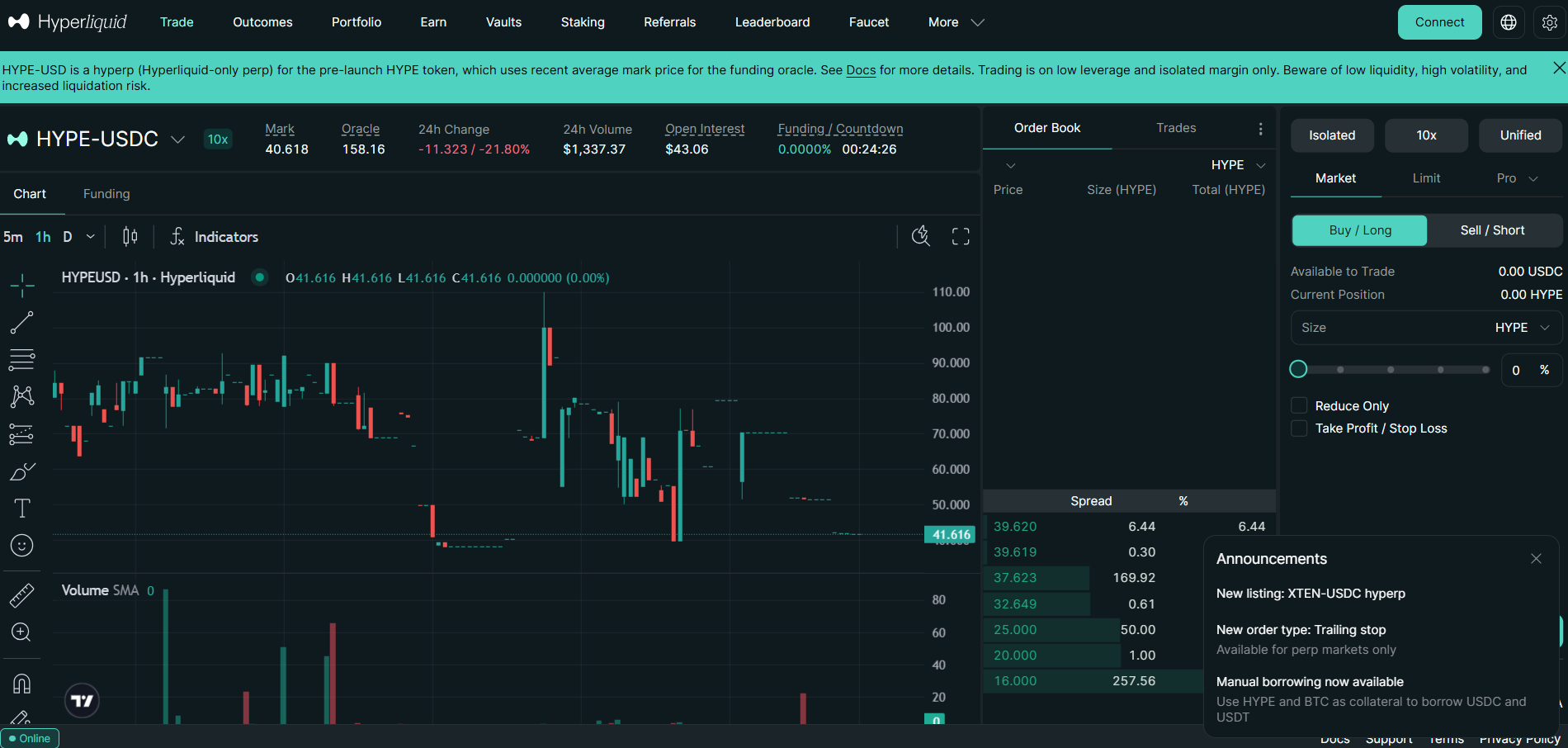
What is the Hyperliquid testnet?
A testnet is a separate environment used to try platform features without using real trading funds. Hyperliquid's faucet can provide 1,000 mock USDC to eligible users. The mock balance is for testnet use and cannot be withdrawn as real money.
Is "Papertrade" the same as paper trading?
No. Papertrade is the name of a separate perpetuals exchange built on Hyperliquid's HyperEVM. It is different from Hyperliquid's testnet. The Block reported that Papertrade uses a shared USDC pool and covered deposits and withdrawals on the product.
For practice with mock funds, use the official Hyperliquid testnet link. Do not rely on a product's name alone to tell whether it uses simulated or real funds.
Do not confuse it with "Papertrade"
A lot of confusion comes from a project literally named Papertrade. Despite the name, it is not a practice tool. It is a real perpetuals exchange built on HyperEVM, offering up to 1,000x leverage, and it launched on October 10, 2026. It prices trades from the midpoint of Hyperliquid's best bid and offer.
Within hours of launch, The Block reported that one trader made roughly $1.28 million by moving ETH prices on Hyperliquid while holding positions on Papertrade. The platform later tightened limits. Takeaway: if a site says "Papertrade", it involves real deposits and real risk. For practice, use the official testnet.
How to start using the Hyperliquid testnet
Step 1: Open the official testnet
Go to official Hyperliquid testnet app. Check the address carefully before connecting your wallet.
Step 2: Use the eligible wallet address
Hyperliquid says that the faucet checks for a previous mainnet deposit from the same address. If you use a wallet extension, connect the address that made that deposit.
Step 3: Check your email-login wallet
Hyperliquid says email login can create different wallet addresses for mainnet and testnet. Its instructions tell users to export their email wallet from mainnet, import it into a wallet extension, and connect that wallet to testnet. Follow the official instructions and never share your private key or recovery phrase.
Step 4: Claim mock USDC
Open the Hyperliquid testnet faucet and follow the instructions. The official guide says eligible users may receive 1,000 mock USDC for testnet use. Do not treat this as a real balance or assume it can be transferred to mainnet.
Step 5: Place a practice order
Choose a market, review the order details and submit a test order. You can also practise cancelling orders and setting order conditions. Hyperliquid lists supported order types in its official trading documentation.
Trading with the API or a Bot
If you are testing a strategy in code, use the testnet endpoints:
| What | Testnet | Mainnet |
|---|---|---|
| API | api.hyperliquid-testnet.xyz | api.hyperliquid.xyz |
| WebSocket | wss://api.hyperliquid-testnet.xyz/ws |
wss://api.hyperliquid.xyz/ws |
| App | app.hyperliquid-testnet.xyz | app.hyperliquid.xyz |
| HyperEVM Chain ID | 998 | 999 |
Approve an API wallet inside the testnet app first (More, then API). Frameworks such as NautilusTrader and the official Python SDK support testnet mode, so you can flip one setting between testnet and live.
What Testnet Will NOT Teach You
This is the section most guides skip, and it is where people lose money after "winning" in practice.
- Prices and liquidity differ. Testnet has its own books and traders, so prices drift from mainnet. Do not judge slippage or fill quality from testnet results.
- Market IDs differ. BTC is asset 0 on mainnet and 3 on testnet. In one comparison, only one of 207 shared perps had the same ID. Always read IDs from the meta endpoint.
- Leverage limits differ. Max leverage differed on 101 of those 207 perps. Never assume the testnet limit matches mainnet.
- API approvals do not carry over. A testnet signature will not work on mainnet. Approve a fresh API wallet when you go live.
- Market orders work differently. Hyperliquid has no native market order type; market-style orders are built from limit orders with a slippage allowance. Test this logic carefully.
- Price precision rules. Prices are limited to a maximum of 5 significant figures. Rounding errors cause rejected orders.
- Emotion. Losing fake money feels nothing like losing real money. Simulators cannot reproduce fear, greed or revenge trading.
The testnet is useful for checking that a bot can connect, submit orders and handle responses. It cannot prove that a strategy will be profitable. Testnet activity and market conditions can differ from mainnet, and simulated trades cannot recreate the pressure of risking real money.
Common problems and simple fixes
"I can't claim test funds."
Check that the wallet address you connected has made a mainnet deposit and that it is the same address used for the faucet. If you use email login, check Hyperliquid's instructions for exporting and connecting the correct wallet.
"My mock USDC is not showing."
Confirm that you are on the testnet and connected to the address that claimed the funds. Check the faucet instructions if the balance still does not appear.
"My bot says the request was OK, but the order failed."
Inspect the status for the individual order, not just the overall API response. Hyperliquid's API examples include an "ok" response with an error in the order's status field. API response examples.
"My bot works on testnet. Is it ready for mainnet?"
Testnet checks are only one part of testing. Confirm the environment, wallet approvals, asset IDs, order settings and risk controls before using mainnet. A testnet result is not a promise of live performance.
Is Testnet Trading Worth It?
Yes, for specific jobs:
- Learning the interface, order types and margin mechanics.
- Testing bot logic, signing, and error handling.
- Rehearsing position sizing and stop-loss discipline.
It is not enough for judging profitability, execution quality or psychology. A sensible path is testnet first, then a very small live position, then scaling only after you have a journal showing consistent process.
A simple seven-day practice plan
- Day 1: Connect to testnet and explore the trading screen.
- Day 2: Place and cancel limit orders.
- Day 3: Practise setting and reviewing stop-loss and take-profit orders.
- Day 4: Test your bot's connection and order responses, if you use one.
- Day 5: Review how position size and margin affect your test account.
- Day 6: Keep a journal of each practice trade and why you entered or exited.
- Day 7: Review what worked and what failed. Do not treat a short test as proof of future returns.
Frequently asked questions
Can I paper trade Hyperliquid without a mainnet deposit?
Hyperliquid's official faucet instructions require a prior mainnet deposit from the same address to claim its mock USDC. Check the official guide for current requirements.
Is Hyperliquid testnet free?
The testnet funds are mock funds with no real-world value. However, Hyperliquid says you must have made a mainnet deposit from the same address to use its faucet.
Can I withdraw testnet profits?
No. Mock USDC is test money and has no real-world value.
Can I test a trading bot on the testnet?
Yes. Hyperliquid documents a testnet API endpoint. Use test credentials and verify that the bot is pointed at testnet, not mainnet.
Will my testnet results match mainnet?
Not necessarily. Hyperliquid documents differences such as asset IDs and margin tiers. Market activity and actual execution can also differ between separate environments.
Is Papertrade the same as Hyperliquid testnet?
No. Papertrade is a separate product built on Hyperliquid's HyperEVM. It is not the Hyperliquid testnet. Read its terms carefully before connecting a wallet or depositing funds.
Final thoughts
Hyperliquid's testnet gives users a place to practise with mock USDC and test API connections. The faucet has a mainnet-deposit requirement, and testnet conditions differ from mainnet. Use it to learn the tools and check your setup, but do not treat practice results as a forecast of live trading. Perpetual trading can involve substantial risk, especially when leverage is used. This article is for information only, not financial advice.